---
title: You’re Not Using HubSpot’s Buyer Intent Tool Right
description: Configure HubSpot Buyer Intent the right way with Envy. Learn how ICP filters, scoring, and workflows turn intent signals into real pipeline.
image: https://blog.goenvy.io/hubfs/Blogs-4.png
---
[Skip to content](https://blog.goenvy.io/hubspots-buyer-intent#main-content)
[](https://goenvy.io)
- Services
Show submenu for Services
- [Elizabeth, The Brain Build](https://goenvy.io/services/elizabeth-creative-messaging/)
- [Harry, Paid Media Planner](https://goenvy.io/services/harry-william-paid-campaigns-gtm/)
- [William, Full GTM Service](https://goenvy.io/services/harry-william-paid-campaigns-gtm/#William)
- [Charles, HubSpot IQ](https://goenvy.io/services/charles-hubspot-ai/)
- [HubSpot Implementation and Onboarding](https://goenvy.io/services/hubspot-implementation-and-onboarding/)
- [HS \<\> LI Warm Outreach Agent](https://goenvy.io/services/warm-outreach-agent/)
- [Resources](https://goenvy.io/resources/)
Show submenu for Resources
- [Banter with Billy](https://goenvy.io/banter-with-billy/)
- [All Resources](https://goenvy.io/resources/)
- [Pricing](https://goenvy.io/pricing/)
- [Blog](https://blog.goenvy.io)
- [Contact](https://goenvy.io/?pop=contact-us)
- Services
Show submenu for Services
- [Elizabeth, The Brain Build](https://goenvy.io/services/elizabeth-creative-messaging/)
- [Harry, Paid Media Planner](https://goenvy.io/services/harry-william-paid-campaigns-gtm/)
- [William, Full GTM Service](https://goenvy.io/services/harry-william-paid-campaigns-gtm/#William)
- [Charles, HubSpot IQ](https://goenvy.io/services/charles-hubspot-ai/)
- [HubSpot Implementation and Onboarding](https://goenvy.io/services/hubspot-implementation-and-onboarding/)
- [HS \<\> LI Warm Outreach Agent](https://goenvy.io/services/warm-outreach-agent/)
- [Resources](https://goenvy.io/resources/)
Show submenu for Resources
- [Banter with Billy](https://goenvy.io/banter-with-billy/)
- [All Resources](https://goenvy.io/resources/)
- [Pricing](https://goenvy.io/pricing/)
- [Blog](https://blog.goenvy.io)
- [Contact](https://goenvy.io/?pop=contact-us)


# You’re Not Using HubSpot’s Buyer Intent Tool Right
[RevOps with HubSpot](https://blog.goenvy.io/tag/revops-with-hubspot), [AI in B2B Marketing](https://blog.goenvy.io/tag/ai-in-b2b-marketing)

Idan Carmeli
[70% of the B2B buyer’s journey happens anonymously](https://6sense.com/science-of-b2b/2024-buyer-experience-report/). This stat gets thrown around a lot because it looks cool and we marketers like numbers, but the reality behind it is really scary. Cause it basically means that most of your present & future customers will research your brand, chat with AI about it, stalk your site, and compare alternatives a long while before they fill out a form or download any of your content. And If you’re not set up to detect and act on that behavior, you’re late to every single deal.
HubSpot’s buyer intent tool (only one of [Enviable HubSpot Jobs](https://hubspotjobs.goenvy.io/), by the way) exists to solve that. It tells you which companies are warming up before they’re in your pipeline. But unless you’ve got your [HubSpot RevOps house in order](https://goenvy.io/services/revops-services-go-envy/), with admin settings, segmentation, scoring, and workflows that actually react to that intent signal, it won’t move a single deal forward.
TL;DR
HubSpot buyer intent only drives pipeline if the signals trigger scoring, lifecycle changes, and automated sales actions.
- Define your **ICP inside HubSpot** (industry, company size, geography, tech stack) so intent signals only track relevant accounts.
- Assign **behavioral scoring** to high-intent actions like pricing page visits, repeat sessions, and content downloads.
- Use enrichment to **identify anonymous company traffic** and match it to real accounts.
- Create lifecycle stages such as **“Intent Qualified”** that trigger when intent thresholds are reached.
- Build **HubSpot workflows** that alert SDRs, assign tasks, enroll nurtures, and launch retargeting when intent spikes.
- Use intent segments to **prioritize sales outreach and marketing campaigns** around accounts already researching your solution.
## HubSpot’s Buyer Intent 101: What It Actually Does?
Out of the box, [HubSpot’s buyer intent tool](https://knowledge.hubspot.com/reports/configure-buyer-intent) is fine. It surfaces first-party and third-party signals, meaning companies on your site, funding news, tech installs, competitive research. It’s directional, not exactly precise, but good enough to know who’s circling. No SDR will say no to receiving such golden nuggets of information.
What it won’t do is to automatically sort those signals into your funnel. Or score them. Or alert the right rep. Or personalize your messaging. That’s your job. Or, if you want it done properly, ours 😉
[](https://blog.goenvy.io/hs/cta/wi/redirect?encryptedPayload=AVxigLJvqWDkhnndbK5sIp7Efl1kd%2FLuU22JrJmBcx63ZMATn0m5NynlwZuFJW0a9pREKpSM4rjpWBnk0LtBI2gx5xf0P8hqzCd%2FUrJe1uq950SPA94GKC9tYpi%2Fud05MdyT3iLHOPKcm3s39TK0zABBPcUTAMphp42Krn3QvB7rZKE6GF3b07k1ckv3eFWTz3UxyLGoE9AiCA4%3D&webInteractiveContentId=174997855655&portalId=1880938)
Essentially, the biggest advantage the buyer intent feature gives you is time. It gives you a chance to act *before* your competitors know there’s a deal in play. But that only works if your systems and people are trained to act on the signal as soon as it hits. So if you’re not ready to act on the signal the moment it hits, it all goes to waste.
## Why Most Teams Get Minimal Value From Buyer Intent
Well, the answer is painfully simple and simply painful. Because they treat it like a campaign tool when it’s not.
Buyer intent isn’t something you “turn on.” It’s something you build around. And if your HubSpot instance isn’t structurally ready with a defined ICP, working segments, lifecycle stages, and real scoring logic, the best intent data in the world won’t help you.
Here’s what we find when we [audit HubSpot](https://goenvy.io/services/b2b-marketing-revops-audit/) instances:
- ICP exists in slides, not inside HubSpot;
- In place of segments are manual lists built for campaigns, not updated dynamically;
- Scoring is based on email clicks, not behavioral patterns;
- And lifecycle stages are out of sync with how buyers actually behave.
So the buyer intent signals flow in… straight into a black hole!
## How HubSpot Breeze Intelligence Uses Buyer Intent to Boost Sales
Breeze Intelligence (which is like the brains behind HubSpot’s buyer intent engine) is built to close the gap between interest and action. It uses AI and a massive company database to enrich your CRM and surface accounts that are likely in-market. But again, you only get the value if you wire it into your GTM motion.
Here’s how Breeze Intelligence helps you actually use buyer intent:
### 1. Finds High-Intent Companies (Even if They Stay Anonymous)
[98% of website visitors don’t fill out a form](https://www.hubspot.com/startups/tech-stacks/sales-csx/website-visitor-playbook). Breeze Intelligence fixes that by matching anonymous traffic to real company profiles using reverse-IP lookup and data enrichment tools like Clearbit Reveal.
That means you can see:
- Which companies are on your site
- What pages they’re viewing (and how often)
- Whether any of those pages fit your intent criteria
- Whether they fit your ICP
So instead of guessing which accounts might be interested, your sales team sees exactly which companies are heating up even *before* a form submission ever happens.
### 2. Prioritize Lead Follow-Ups Based on Buyer Behavior
Not all engagement is created equal. Someone skimming a blog post is not the same as someone spending six minutes on your pricing page. Breeze Intelligence tracks behavior that correlates with real buying intent and lets you prioritize accordingly.
Examples are:
- **[Pricing page](https://goenvy.io/pricing/) visits** indicate they’re comparing vendors. Sales should reach out.
- **Whitepaper downloads** signal active research. Time for tailored nurture.
- **Homepage skim** most likely means an early-stage. Probably not ready for SDR outreach yet.
With these insights in order, your team stops wasting time on cold leads and starts focusing on the ones who are actively looking.
### 3. Automate Lead Routing with HubSpot Workflows
The minute someone shows high intent, the clock starts ticking. Breeze Intelligence integrates directly with HubSpot workflows so you can automate routing, follow-ups, and prioritization.
Smart teams use it to:
- Trigger Slack or email alerts to reps when a high-fit account shows repeated activity
- Automatically enroll leads in personalized sequences based on behavior
- Assign hot accounts to SDRs based on region, industry, or product interest
- Send “just-in-time” resources based on last viewed content
So instead of leads sitting idle in your CRM, you get an instant system of action.
## Configuring Your Buyer Intent in HubSpot
### 1. Define your ICP and intent filters inside HubSpot
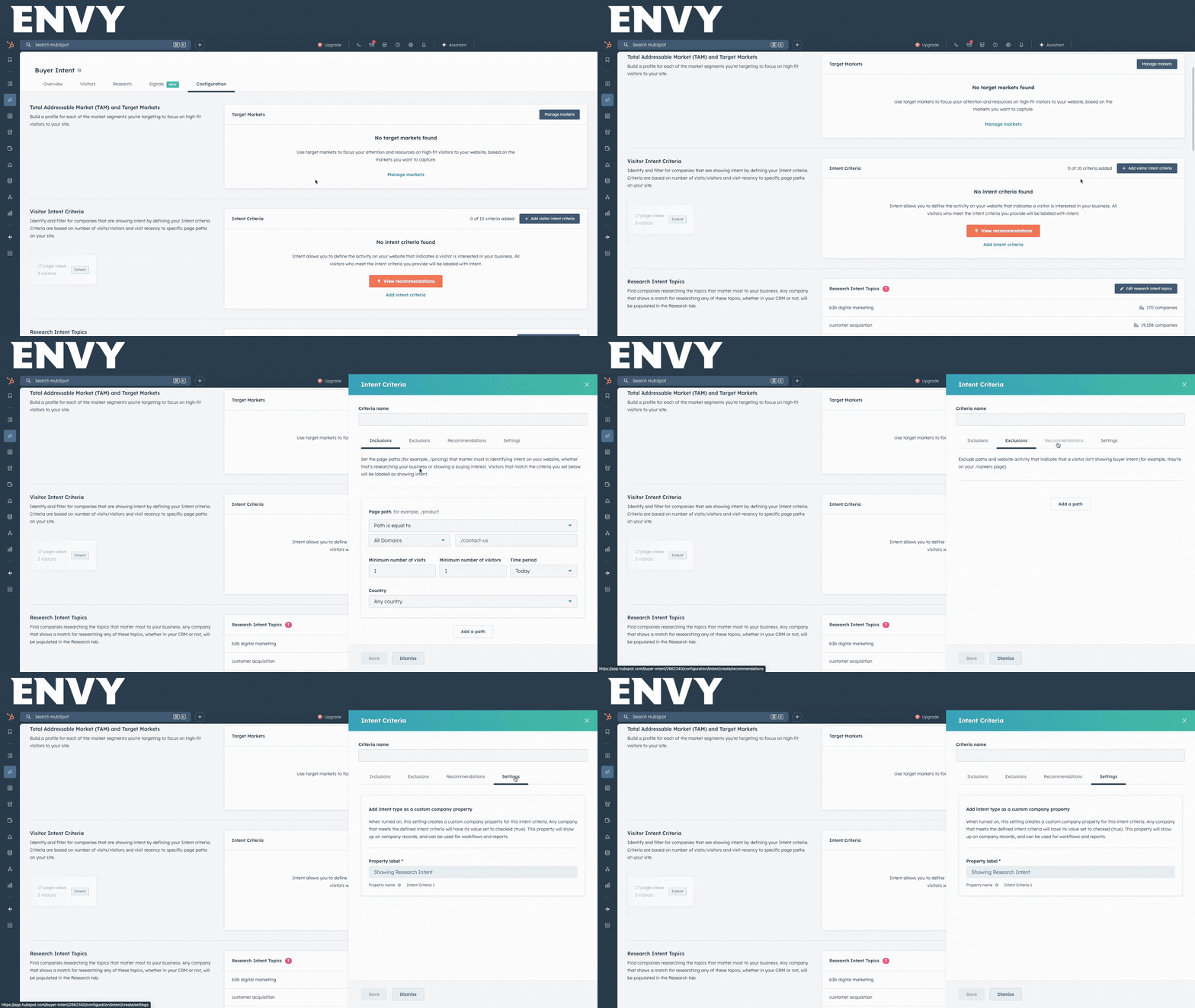
It’s shocking how often this is skipped. Your target market and ICP should not live in a slide deck. They need to live in dynamic lists and CRM properties built from:
- Industry
- Employee size
- Tech stack
- Geographic scope
- Account tier
Once your ICP is codified, you can use Breeze Intelligence to only track intent from companies that match it. That means fewer false positives, better routing, and actual sales value.
### 2. Map buyer behavior to real scoring logic
Not all behavior is equal. Someone skimming a blog post is probably still in research mode. But someone returning to your pricing page three times in a week… that’s a buying signal.
Breeze tracks:
- Repeated visits to key product or pricing pages
- Time on page (5+ minutes ≠ casual browser)
- Content downloads (whitepapers, case studies)
In HubSpot, assign scoring weights to these behaviors. That way, leads with serious intent rise to the top automatically.
### 3. Build lifecycle logic that reflects reality
If your lifecycle stages only change when a form is filled, you're doing it wrong.
Let’s say a target account visits your solutions page, downloads a buyer’s guide, and returns two days later to view your integrations page. If no known contact fills out a form, most HubSpot setups do… nothing.
That account should move into an “Intent Qualified” stage. Someone should get notified. And a trigger should fire.
Your lifecycle stages need to:
- Reflect account-level activity
- Tie into sales routing and prioritization
- Trigger nurture or outreach workflows
If you’re not moving accounts forward based on intent, you’re leaving pipeline on the table.
## What Operationalized Intent Looks Like
Here’s where most companies fail. They set up buyer intent, maybe build a couple lists, and then… nothing. The signals come in. No one acts. The data doesn’t inform campaigns, nurture, or sales prioritization.
If you want buyer intent to actually do something, you need rules. Rigid ones. Automated ones. And they need to trigger actual GTM plays.
Here’s what that looks like:
- **If** high-fit company visits pricing page twice in 48 hours, **then**: auto-create task for assigned SDR, Slack alert to AE + marketing, enroll contact (if known) in 3-email sequence, trigger ads targeting job titles in that account;
- **If** anonymous visitor from \[targeting industry\] firm hits product comparison pages, **then**: add account to ABM nurture list, trigger retargeting ads, sSDR sequence sent once contact is identified;
- **If** known contact downloads whitepaper and returns within 3 days, **then:** personal outreach with industry-specific case study, move to “Marketing Qualified – Intent” stage;
We hate to say this, but if your buyer intent signals don’t move anyone in your CRM or in your team, you don’t have a RevOps function. You have a reporting tool.
## What Marketing Can Do With Buyer Intent
Buyer intent isn’t just for sales prioritization! Marketing can (and should) build campaigns around it.
- Visitors who hit pricing → Retarget with competitive comparison messaging
- Visitors who download a guide → Enroll in content sequence based on vertical
- Repeat visitors from specific industries → ABM campaign targeting multiple stakeholders
- Unqualified traffic (job seekers, competitors) → Suppression lists to avoid wasted ad spend
When intent data informs your segments, your campaigns become focused, timely, and relevant. Paid channels stop burning budget. Content aligns with actual buyer behavior. And your marketing starts performing like part of the revenue engine. Chef’s kiss.
## Want Buyer Intent to Actually Drive Pipeline?
If you’re paying for HubSpot’s buyer intent and wondering why your pipeline isn’t moving, it’s probably the setup. Luckily for you, we’ve helped teams turn passive signals into revenue-producing workflows. And we do it without bloated strategy decks or four-month onboarding timelines.
[Book time with Idan](https://l.goenvy.io/meetings/idan18/call-w-idan) and get a RevOps brain on your buyer intent setup before another month of signals goes to waste.
[](https://blog.goenvy.io/hs/cta/wi/redirect?encryptedPayload=AVxigLLpIckLttmyEHPDo%2Btvs%2BXH%2FcChd0As3UxLKQ1tB9v14e8kaIwXhm61ZaUwcUac59RDPytsxZHIZB%2BLLSb%2B%2FE%2B6u52a9scKC67UBsZq1AXgpxK5niJOYV%2BIBHnuBUXF2r5y1PvDNzTa7orhAyuh5i%2B%2Bzv1EA6n9DXoH5bm%2FI7Nekn349UgdTWKb7srckJ0xE11r&webInteractiveContentId=169423770517&portalId=1880938)
Share 
[](http://www.linkedin.com/shareArticle?mini=true&url=https%3A%2F%2Fblog.goenvy.io%2Fhubspots-buyer-intent%3Futm_medium%3Dsocial%26utm_source%3Dlinkedin) [](http://www.facebook.com/share.php?u=https%3A%2F%2Fblog.goenvy.io%2Fhubspots-buyer-intent%3Futm_medium%3Dsocial%26utm_source%3Dfacebook) [](https://twitter.com/intent/tweet?original_referer=https%3A%2F%2Fblog.goenvy.io%2Fhubspots-buyer-intent%3Futm_medium%3Dsocial%26utm_source%3Dtwitter&url=https%3A%2F%2Fblog.goenvy.io%2Fhubspots-buyer-intent%3Futm_medium%3Dsocial%26utm_source%3Dtwitter&source=tweetbutton&text=)
[Start Your Free 30 Day  Trial Today](https://goenvy.io/contact)
About the Author

Idan Carmeli
Idan Carmeli is a managing partner at Envy. He is an experienced B2B marketer, 100% focused on developing and helping organizations implement Marketing Operations Centers of Excellence. He provides professional consulting, guidance, implementation and operation services to B2B organizations that utilize marketing & sales automation systems Fun fact: Idan aspires to become an Olympic swimmer. His category is 48yr olds with Inadequate Sport Aspirations.
### Sign Up For Updates
[](https://blog.goenvy.io/hubspot-linkedin-warm-outreach-agent)
### [Why Your SDRs Hate LinkedIn (and What You Can Do About It)](https://blog.goenvy.io/hubspot-linkedin-warm-outreach-agent)
[.png?width=352&name=ENVY%20Blog%20Charles%201%20(1920x1080).png)](https://blog.goenvy.io/hubspot-data-ready-for-ai)
### [Your HubSpot AI Is Only as Good as Your Data](https://blog.goenvy.io/hubspot-data-ready-for-ai)
[](https://blog.goenvy.io/hubspot-for-b2b-abm)
### [Using HubSpot for B2B Account Based Marketing (ABM)](https://blog.goenvy.io/hubspot-for-b2b-abm)
[](https://goenvy.io)

Resources
- [Banter with Billy](https://goenvy.io/banter-with-billy/)
- [Case Studies](https://goenvy.io/resource_type/case-studies/)
- [Videos](https://goenvy.io/resource_type/videos/)
Services
- [Elizabeth, The Brain Build](https://goenvy.io/services/hubspot-implementation-and-onboarding/)
- [Hary, Paid Campaign Planner](https://goenvy.io/services/harry-william-paid-campaigns-gtm/)
- [William, Full GTM Service](https://goenvy.io/services/harry-william-paid-campaigns-gtm/#William)
- [Charles, HubSpot IQ](https://goenvy.io/services/charles-hubspot-ai/)
- [HubSpot Implementation & Onboarding](https://goenvy.io/services/hubspot-implementation-and-onboarding/)
- [HS \<\> LI Warm Outreach Agent](https://goenvy.io/services/warm-outreach-agent/)
Company
- [Pricing](https://goenvy.io/pricing/)
- [Privacy Policy](https://goenvy.io/privacy-policy/)
We like to share thoughts
[Follow us on Facebook](https://www.facebook.com/GoEnvy) [Follow us on LinkedIn](https://www.linkedin.com/company/goenvy/) [Follow us on Twitter](https://twitter.com/mktgenvy) [Follow us on Instagram](https://www.instagram.com/billy.cina) [Follow us on Instagram](https://www.youtube.com/@Get_Envy)


© Powered by the tears of ambitious and envious CXOs
© Copyright 2026 Envy
```json
{
"@context" : "https://schema.org",
"@type" : "BlogPosting",
"author" : {
"@type" : "Person",
"name" : "Idan Carmeli",
"url" : "https://blog.goenvy.io/author/idan-carmeli"
},
"dateModified" : "2026-03-10T09:28:49.791Z",
"datePublished" : "2026-03-10T09:20:32.000Z",
"headline" : "You’re Not Using HubSpot’s Buyer Intent Tool Right",
"image" : [ "https://blog.goenvy.io/hubfs/Blogs-4.png" ],
"mainEntityOfPage" : {
"@id" : "https://blog.goenvy.io/hubspots-buyer-intent",
"@type" : "WebPage"
},
"publisher" : {
"@type" : "Organization",
"logo" : {
"@type" : "ImageObject",
"url" : "https://blog.goenvy.io/hubfs/Envy-logo-Black.png"
},
"name" : "Envy"
}
}
```